Trace Your Link Click Spikes

Rule out bots first, then trace the source. Check whether clicks arrive within a minute or two of an email send, whether every link in the message was clicked, whether one network range owned by Microsoft, Google or Amazon Web Services [AWS] produced the clicks and whether time on page stayed flat. If the traffic looks human, break the spike down by referrer, country, device and hour, pin the start to the hour and search for pages published just before it, using tools that filter by date and source. Prevent the next mystery by giving each channel and partner its own tagged short link, keeping a shared log of sends and launches and setting brand-mention alerts.
What usually causes a sudden spike in link clicks?
Most spikes come from one of four sources: automated traffic, a reshare in a place you don't monitor, an outside event that made your topic newsworthy, or something your own team did and forgot to mention.
How can I tell whether a spike is real or bots?
Look for clicks that arrive within a minute or two of an email send, every link in the same email being clicked, a large group of clicks from one IP range and click volume that rises while time on page, scroll depth and conversions stay flat.
Why do email security tools create clicks?
Corporate email security tools open the links in incoming messages to check them for phishing before the recipient sees the email. A wave of these scans can arrive within seconds of delivery and look like an excited audience.
Do messaging apps also click my links?
Yes, on a smaller scale. When someone pastes your link into Slack, iMessage or WhatsApp, the app fetches the page to build a preview card.
How do I check where my link clicks came from?
Break the spike down by referrer, country, device and hour before you settle on a theory. UTM parameters tell you which campaign each click belongs to.
What is dark social?
Sharing through messaging apps and email clients, which strip referrer data. You know people are passing the link around, but the analytics can't say where.
How do I connect a traffic jump to something on the web?
Pin the spike down to the hour, then match its start to the publication times of pages that mention you, your product or your topic. Search for your brand name, the full URL and the short link itself.
What do different sources look like on a chart?
A forum thread climbs steeply and fades within six to twelve hours, news coverage decays more slowly, a newsletter makes one sharp burst at send time, and scanner traffic appears as a flat block that starts and stops abruptly.
Why am I getting clicks but no sales?
People arriving from a news story are mostly curious about the story and only a small share are near a purchase. A retargeting pixel on the link and a short note on the landing page can help.
How can I catch the next spike while it happens?
Give each channel and partner its own short link or UTM tag, keep a shared log of sends, posts and launches, and monitor brand and topic mentions with alerts on new articles and threads.
A short link that normally gets around 40 clicks a day suddenly shows 900 by lunchtime. Most people feel pleased for a minute or two and then start to get suspicious. Did a post take off, did a journalist quote your page, or did a security scanner at some large company just open every link in your newsletter?
Click dashboards are good at telling you that something happened and much weaker at explaining why. The number in the chart is a count of requests to a URL. Whether those requests came from people, from automated systems, or from readers of an article you have never seen is a separate investigation, and with the right checklist it rarely takes more than an hour.
What usually causes a sudden spike in link clicks?
Most click spikes come from one of four sources: automated traffic, a reshare in a place you don't monitor, an outside event that made your topic newsworthy, or something your own team did and forgot to mention. The last one happens more often than people admit: a sales rep adds your link to a sequence going out to 3,000 contacts, or a partner drops it into their newsletter, and the analytics pick it up hours before anyone tells marketing.
The other three take more digging. Bot traffic leaves technical fingerprints that you can check inside the analytics itself. Reshares and outside events happen on pages you don't own, though, so your click data only shows their effect. Web operators have long called this a flash crowd or the Slashdot effect: a popular site links to a smaller one, and traffic surges.1 To find the cause, you need web search tools that can filter results by publication date and source, because a regular search engine sorts pages by relevance and will happily show you a three-year-old article first.
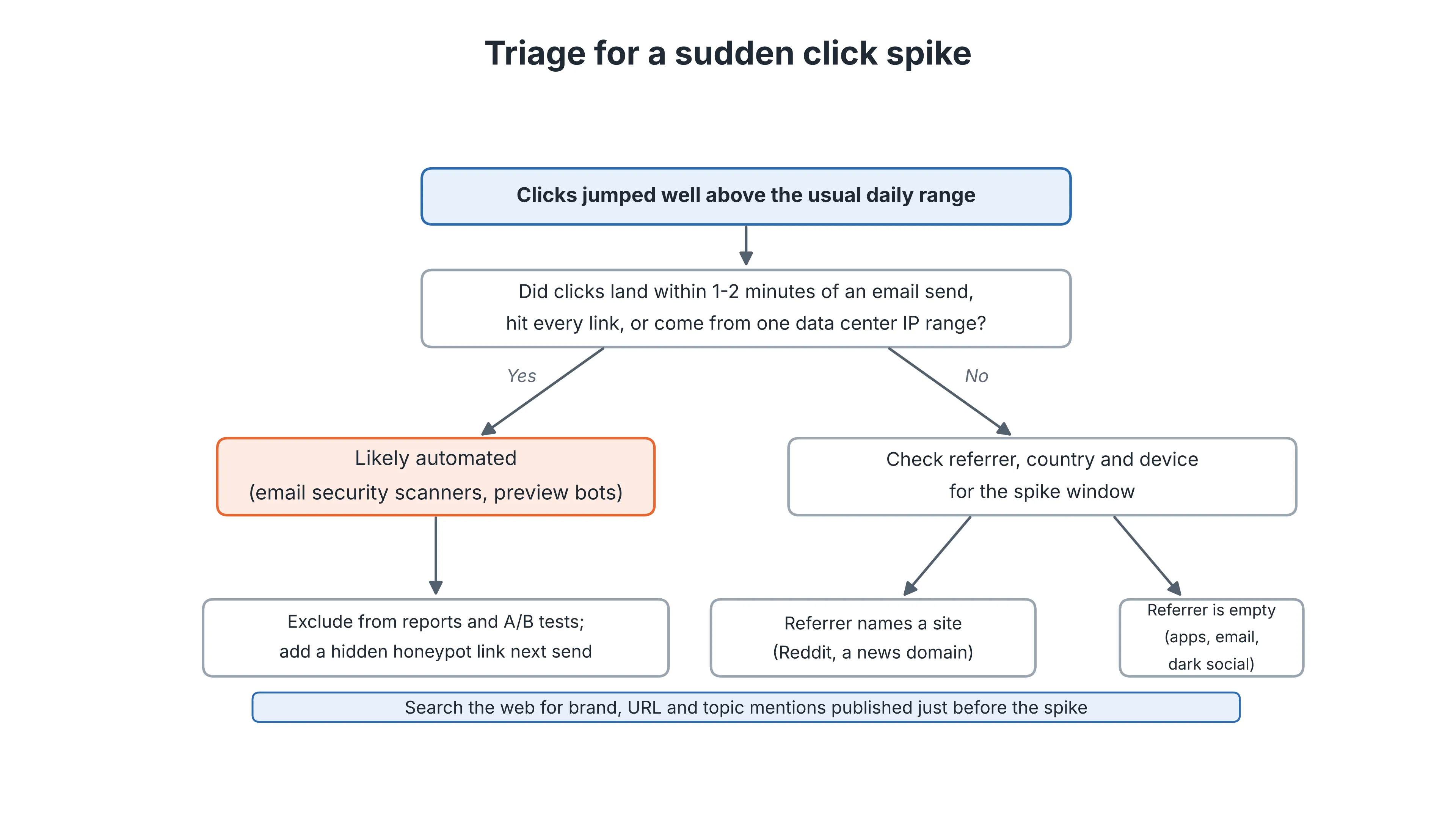
A quick triage path works in this order: rule out automated clicks first, then use referrer data to decide where to search.
Is the spike real, or are bots clicking my links?
A spike can easily be automated, so rule out bots before anything else. Imperva's 2025 Bad Bot Report found that bots generated 51% of all web traffic in 2024, the first time in a decade that automated activity outweighed human visits. The same report split global traffic into 49% human, 37% bad bots and 14% good bots.2 Plenty of those bots are harmless, and some of them click links for perfectly good reasons.
Corporate email security is the classic example. Tools such as Microsoft Defender Safe Links, Mimecast and Barracuda open the links in incoming messages to check them for phishing before the recipient ever sees the email. Microsoft's documentation describes Safe Links as scanning URLs in inbound messages before delivery and checking them again at the time of click.3 If you send a campaign to a business-to-business [B2B] list, a wave of these scans can arrive within seconds of delivery and look exactly like an excited audience. Messaging apps do something similar on a smaller scale: when someone pastes your link into Slack, iMessage or WhatsApp, the app fetches the page to build a preview card. Slack's developer documentation, for example, states that its servers must fetch every URL in a message to determine what kind of content it references.
A few patterns usually give automated clicks away:
- Clicks arrive within a minute or two of an email send, before most people could have opened the message
- Every link in the same email gets clicked, including the footer links nobody reads
- A large group of clicks comes from one Internet Protocol [IP] range, typically owned by Microsoft, Google or Amazon Web Services [AWS]
- Click volume rises while time on page, scroll depth and conversions stay flat
Is automated traffic like this harmful? For the site itself, rarely. Reporting is where it causes trouble, because an A/B test or a lead-scoring rule built on scanner clicks will reward whichever email happened to reach the most corporate inboxes.
Consider an illustrative case. A newsletter goes out at 09:00, and by 09:02 the short link shows 600 clicks, including the footer links, almost all from one Microsoft-owned IP range, while time on page stays near zero. That combination points to a scanner and not to an audience, so the spike needs no further search for a cause.
How do I check where my link clicks came from?
Break the spike down by referrer, country, device and hour before you settle on a theory. Most link management platforms show these dimensions by default (Replug, for instance, reports clicks by referrer, location and device for each short link), and Urchin Tracking Module [UTM] parameters tell you which campaign each click belongs to. Google's documentation explains that UTM values are case sensitive, so utm_source=google and utm_source=Google appear as different sources, and missing parameters show up as (not set) in reporting.4
Each of these views narrows the search in its own way, so a jump in clicks from reddit.com or news.ycombinator.com points to a thread. A sudden rise in one country, say Germany, when most of your audience sits in the US, suggests a regional publication or a translated newsletter picked up the link. Mobile-heavy spikes with an empty referrer tend to mean the link is moving through messaging apps or email clients, which strip referrer data. Marketers call that kind of sharing dark social, and it is the frustrating case: you know people are passing the link around, but the analytics can't say where.
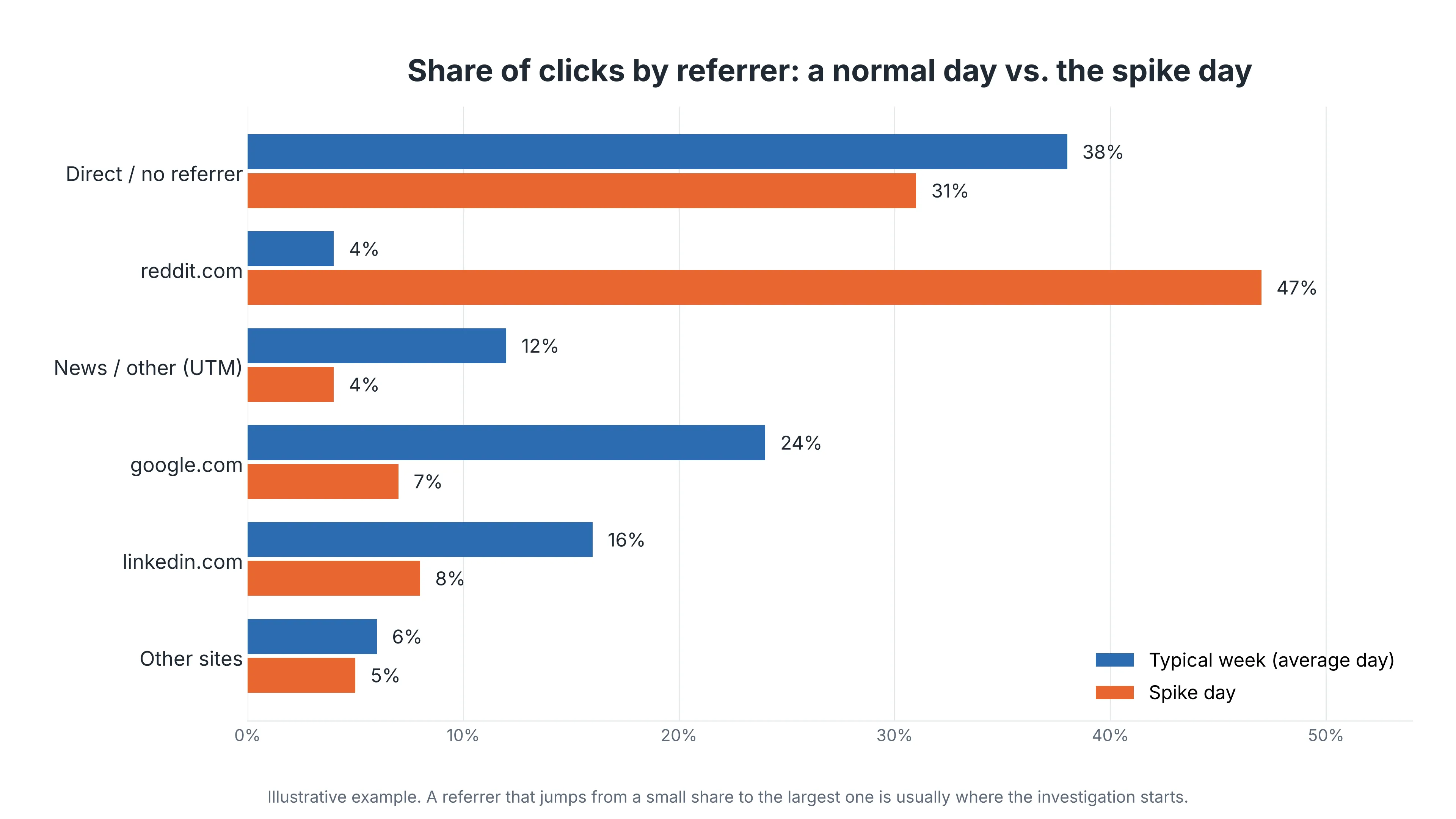
Comparing referrer shares for a normal day and the spike day shows which source changed. In one such comparison, reddit.com went from a minor referrer to almost half of all clicks.
How do I connect a traffic jump to something that happened on the web?
Match the exact start of the spike to the publication times of pages that mention you, your product, or the topic the link covers. Timing is the strongest evidence you will get, so first pin the spike down to the hour using the hourly view in your analytics, and note the time zone your dashboard reports in.
Then look at what was published in the few hours before that point. Search for your brand name, the full URL and the short link itself, since people copy whichever version they saw. Search for the topic as well. A link to your guide on European Union [EU] data rules can triple in a day because a regulator announced something, even if no article names your company. Reddit, Hacker News, LinkedIn and industry newsletters are worth checking by hand, while coverage across thousands of news sites is easier to query through a news or web search application programming interface [API] that returns a publication timestamp with every result.
The shape of the curve then helps confirm the match, because different sources tend to produce recognizably different spikes. If your curve doesn't resemble the source you found, keep looking.
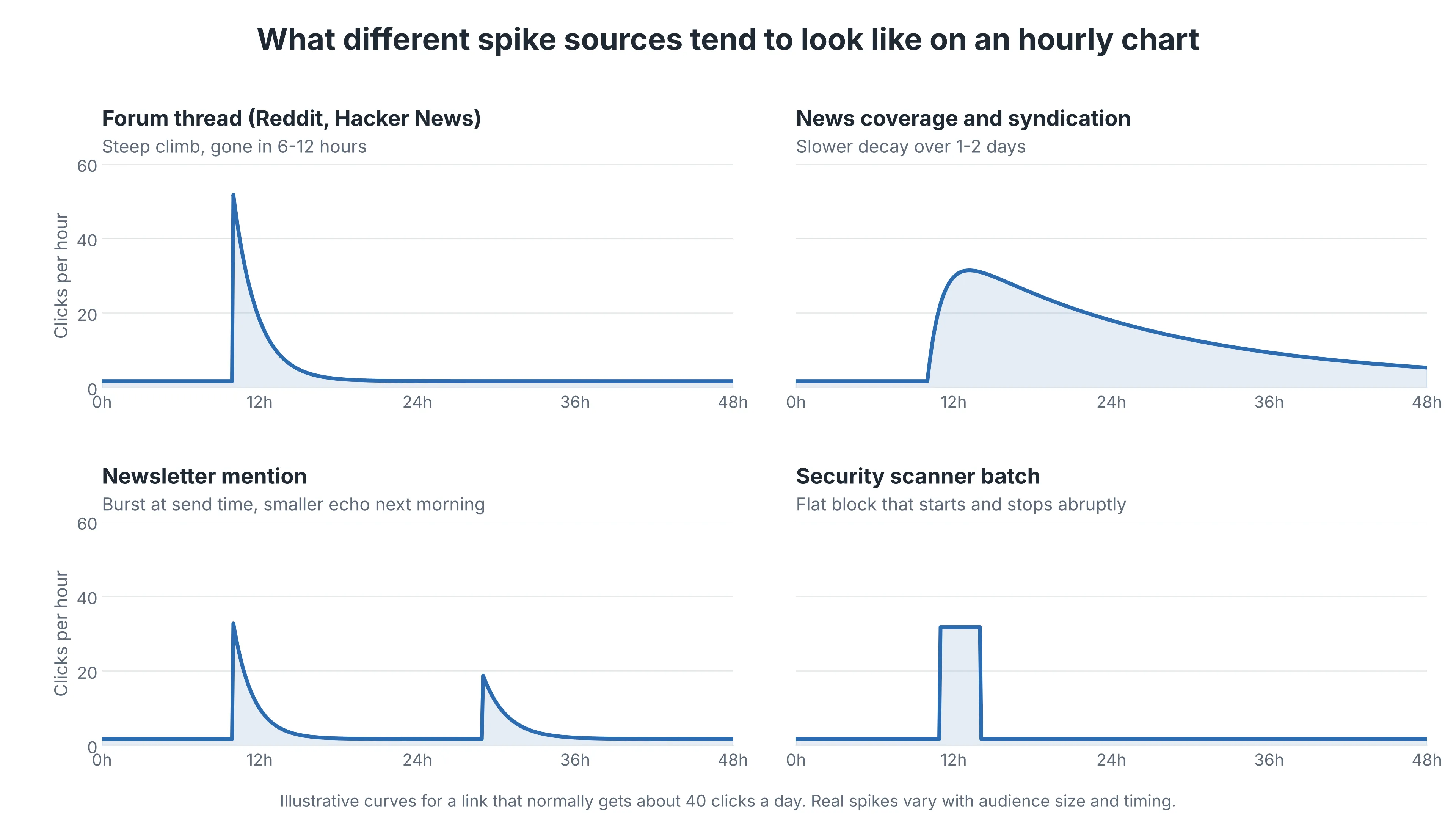
A forum thread climbs steeply and fades within six to twelve hours, as the post slides off the front page. News coverage decays more slowly, because syndication and aggregator pickups keep sending readers for a day or two. A newsletter produces one sharp burst at send time with a smaller echo the next morning when late readers catch up. Scanner traffic looks different again, appearing as a flat block that starts and stops abruptly, often on a round minute. When the curve and the source don't line up, consider that two events may overlap, which happens more than you'd expect around big industry news.
Why am I getting clicks but no sales?
When the spike turns out to be human, the next question is whether those visitors were ever likely to buy. People who arrive from a news story are mostly curious about the story itself, and only a small share of them are anywhere near a purchase. Even so, a retargeting pixel on the link lets you reach those visitors later with an offer, and a short note on the landing page that refers to the news can keep more of them reading. Judge those visitors by engagement and not by the raw click count, because time on page and scroll depth show whether anyone actually read the page.
If the spike comes with almost no engagement at all, go back to the bot checks, since a few hundred human visitors would almost certainly leave some scroll depth and time on page behind.
How can I catch the next spike while it's happening?
Set things up so the next investigation takes minutes. Give each channel and each partner its own short link or UTM tag, so a newsletter mention shows up under its own name. Keep a simple shared log of when your team sends emails, publishes posts and launches ads, because internal activity explains a surprising number of mystery spikes. And monitor mentions of your brand and core topics continuously, with alerts on new articles and threads, so the likely cause reaches your inbox around the same time the clicks do.
After a few rounds you'll start to recognize your own patterns, such as which publications send readers who stay and read, and which forums send a crowd that leaves within ten seconds.
A spike in link clicks is a count of requests to a URL, and the count alone does not say who made them. Automated scanners, link previews, reshares on pages you do not own, outside news and your own team's activity all produce similar charts. The investigation follows a fixed order: rule out bots, break the clicks down by referrer, country, device and hour, match the start of the spike to what was published, and compare the shape of the curve with the source you found. Human visitors who arrive from a news story may be curious rather than ready to buy, so measure engagement before celebrating. Tagged links, a shared activity log and brand alerts make the next investigation a matter of minutes.
Citation
Cite this article
Sridharan, M. A. (2026, November 18). Trace Your Link Click Spikes. Think Insights. https://thinkinsights.net/community/trace-your-link-click-spikes (Accessed [[ACCESS_DATE]])
Sridharan, Mithun A. "Trace Your Link Click Spikes." Think Insights, 18 Nov. 2026, https://thinkinsights.net/community/trace-your-link-click-spikes. Accessed [[ACCESS_DATE]].
Mithun A. Sridharan, "Trace Your Link Click Spikes," Think Insights, November 18, 2026, https://thinkinsights.net/community/trace-your-link-click-spikes. Accessed [[ACCESS_DATE]].
Sridharan, M.A. (2026) 'Trace Your Link Click Spikes', Think Insights. Available at: https://thinkinsights.net/community/trace-your-link-click-spikes (Accessed: [[ACCESS_DATE]]).
M. A. Sridharan, "Trace Your Link Click Spikes," Think Insights, 2026. [Online]. Available: https://thinkinsights.net/community/trace-your-link-click-spikes. [Accessed: [[ACCESS_DATE]]].
Sridharan MA. Trace Your Link Click Spikes. Think Insights. Published November 18, 2026. Accessed [[ACCESS_DATE]]. https://thinkinsights.net/community/trace-your-link-click-spikes
Test Your Knowledge
Trace Your Link Click Spikes
Challenge yourself on the concepts from this article and see how well you understood them.
Subscribers get weekly quizzes and insights — subscribe free
Sponsor this article
Partner with Think Insights
Reach 50,000+ business leaders, consultants, and strategists. Feature your brand alongside expert articles on strategy, leadership, and digital transformation.
Become a Sponsor