Satisfying Desk Videos From Photos


Start with one well-composed desk photo and animate only one or two elements, such as a lamp or rising steam, using an artificial intelligence [AI] video generator. Write the prompt around the motion, the camera move, the light change and the tone, and keep every other object still. Choose the aspect ratio before you generate: 9:16 for TikTok, Instagram Reels and YouTube Shorts, and 16:9 for YouTube desk tours. Limit each clip to one slow camera move, make the opening and closing frames look alike so the clip loops, and publish a recurring series so viewers return. Add a soft ambient soundtrack that matches the on-screen motion.
Why does satisfying desk content hold viewers without a story?
The genre draws on the pleasure of order, small deliberate movements and calm control over an environment. The visuals alone hold attention, so the video needs no narrative or call to action.
What makes a good source photo for a desk video?
The best photos already show intentional arrangement, with items placed with purpose, consistent color tones and enough texture to make small movements meaningful. At least one element, such as a lamp or plant, should be able to move.
How many motions should a prompt describe?
One or two. A single lamp turning on, a pen rolling into place or steam rising from a cup produces a more satisfying result than animating the entire scene.
What is a cinemagraph, and why does it matter here?
A cinemagraph is a still photograph in which a minor and repeated movement occurs. Desk videos follow the same principle, with a few elements in motion against a still scene.
What does Seedance 2.5 add to this workflow?
It renders restrained, small-scale motion such as a slow pan, a gentle light change and soft steam without overanimating the rest of the scene. Dreamina's launch announcement lists clips up to 30 seconds long.
Which aspect ratio should I choose?
Use 9:16 for TikTok and Instagram Reels, and 16:9 for YouTube desk-tour content. Short-form platforms favor vertical frames.
What should the prompt include?
Name the genre, the objects to keep from the image, the specific motion, the camera move, the light change, the tone and the duration. A prompt that covers all of these leaves little room for unwanted motion.
How do I make the clip loop cleanly?
Design the motion so that the opening and closing frames look similar. Test the loop by playing it several times in a row and watching the seam.
Where does this content perform best?
TikTok and Instagram Reels satisfying niches, YouTube Shorts and desk-tour channels, study-with-me and focus-session communities, and stationery, tech and home office marketing.
How do I turn one video into a series?
Keep the framing consistent and vary the time of day, season or workspace configuration. A recurring format gives followers a reason to return for the next installment.
Watching a well-organized desk come to life holds a quiet, almost hypnotic appeal: pens align, a lamp clicks on and a keyboard catches soft light. Productivity and desk-aesthetic content has built an entire genre around that appeal, and most of it starts from nothing more than one well-composed photo of a workspace. Artificial intelligence [AI] now makes it easy to animate that photo, and an effective AI video generator can turn a still desk image into a satisfying short clip. Dreamina's Seedance 2.5 model supplies the smooth, deliberate motion that makes this content watchable. This article explains how to apply it to your own workspace.
Why satisfying desk content performs reliably
This genre draws on something close to autonomous sensory meridian response [ASMR]: the pleasure of order, small deliberate movements and a sense of calm control over one's environment. Viewers require neither a narrative nor a call to action, because the quiet satisfaction of the visuals sustains attention independently. Research on the related ASMR experience offers a clue about why calm visuals attract audiences. In a University of Sheffield study published in PLOS One, half of the participants were recruited because they identified as experiencing ASMR, and those participants showed an average heart rate decrease of 3.14 beats per minute while watching ASMR videos, compared with participants who did not.1 The study tested ASMR videos rather than desk content, so creators should read it as context for why ordered, quiet visuals draw viewers, not as proof of an effect from any single clip. The pattern still explains how a lamp turning on can hold an audience that never sees a person, a story or an offer.
Choosing a desk setup with strong visual rhythm
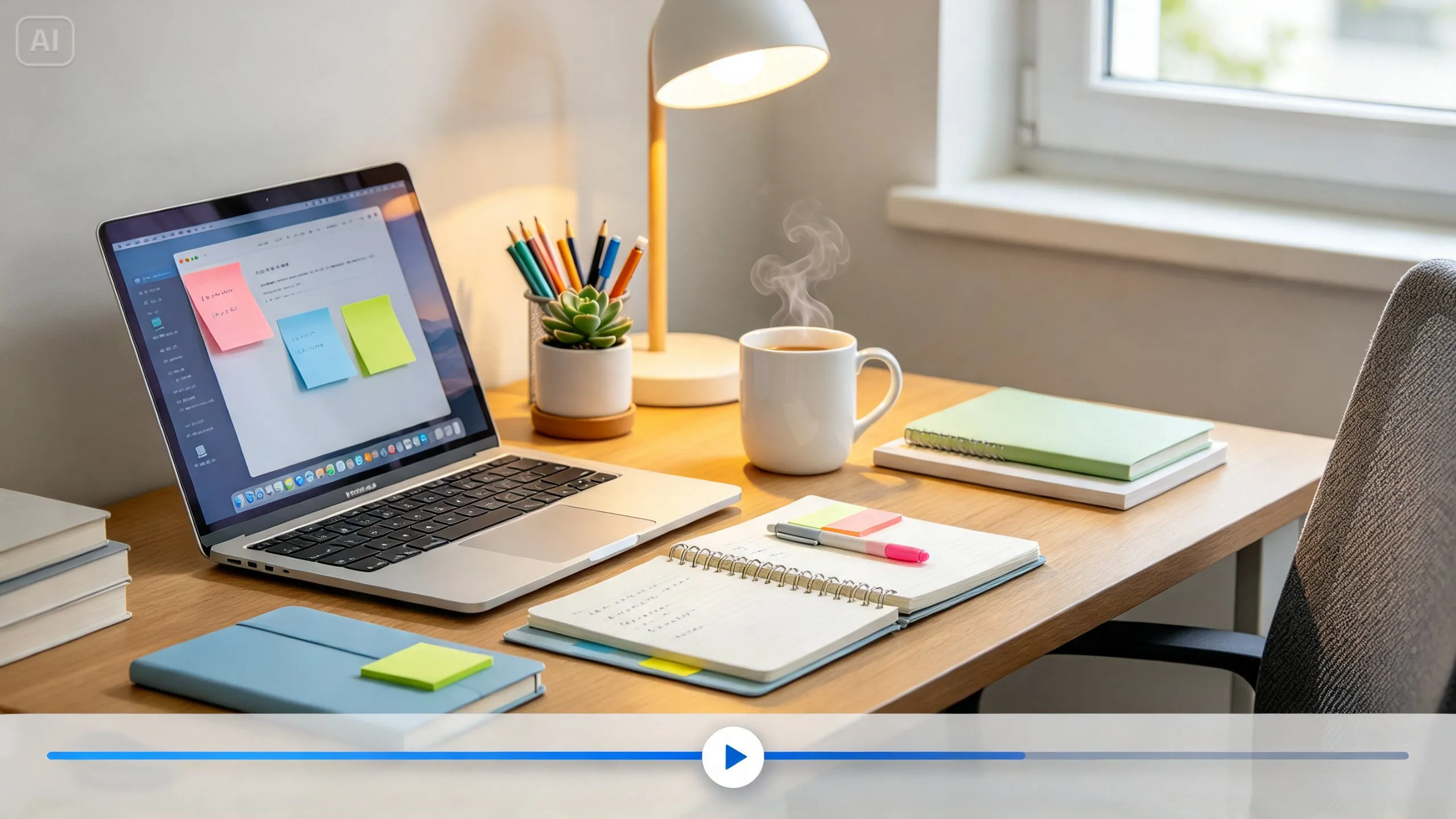
The best source photos already contain a sense of intentional arrangement: items placed with purpose, consistent color tones and enough visual texture to make small movements feel meaningful. The video model can animate only the material that the photograph provides, so a cluttered composition produces a cluttered clip. Check the desk against these criteria before you shoot:
- A clean, deliberately arranged desk with minimal clutter
- A cohesive color palette across desk accessories and surfaces
- At least one element, such as a lamp or plant, that can plausibly move or shift
The movable element carries the greatest weight, because it supplies the prompt with a subject. A plant can sway slightly, a lamp can change the light on the keyboard and a mug can release steam. A photograph containing none of these elements leaves the model with little to animate except the camera movement.
Describing small, deliberate motions that create satisfaction
The entire appeal of this genre lives in restraint. A prompt that describes a single lamp turning on, a pen rolling gently into place or soft steam rising from a cup produces a far more satisfying result than one that tries to animate the entire scene into constant motion. Photography already has a name for this principle: a cinemagraph is a still photograph in which a minor and repeated movement occurs, which sets the moving part against the stillness of the rest of the image.2 Desk videos apply the same principle, with one or two elements in motion while the remaining composition holds still. Determine the motion before you write the prompt, and describe it in precise language: which object moves, in which direction and at what pace. Imprecise instructions such as make it dynamic encourage the model to animate everything, which eliminates the calm atmosphere that viewers expect.
Seedance 2.5 and its precision with small movement
Seedance 2.5 is the video generation model behind Dreamina's motion work. It suits this genre because it renders restrained, small-scale motion convincingly, including a slow pan, a gentle light change and soft rising steam, without overanimating the rest of the scene. That restraint is what makes satisfying content satisfying, rather than overwhelming or artificial-looking. Dreamina's launch announcement describes Seedance 2.5 as ByteDance's video and audio model, with clips up to 30 seconds long and support for up to 50 multimodal references per clip, including images. A desk video requires only one reference image, and the 30-second ceiling accommodates a single slow reveal with considerable room to spare. Treat these figures as the vendor's own claims, and test the output against your photo before you commit to a series.
Building a productivity video in three moves
The workflow has three steps, and the first two decide most of the result. Complete them in sequence, because the reference image and the prompt establish the ceiling for every subsequent decision. Expect to iterate, since a first generation rarely matches the mental image that prompted it. Keep the model setting and the length unchanged between attempts so that you can see which change caused a difference. Preserve the versions that show promise, because a weaker clip sometimes contains the most effective single moment.
Upload a reference image and write the prompt
Visit Dreamina, sign in and open the AI Video section. Click Add reference image to upload your desk photo, then write a prompt that names what to take from the image and the specific satisfying motion you want.
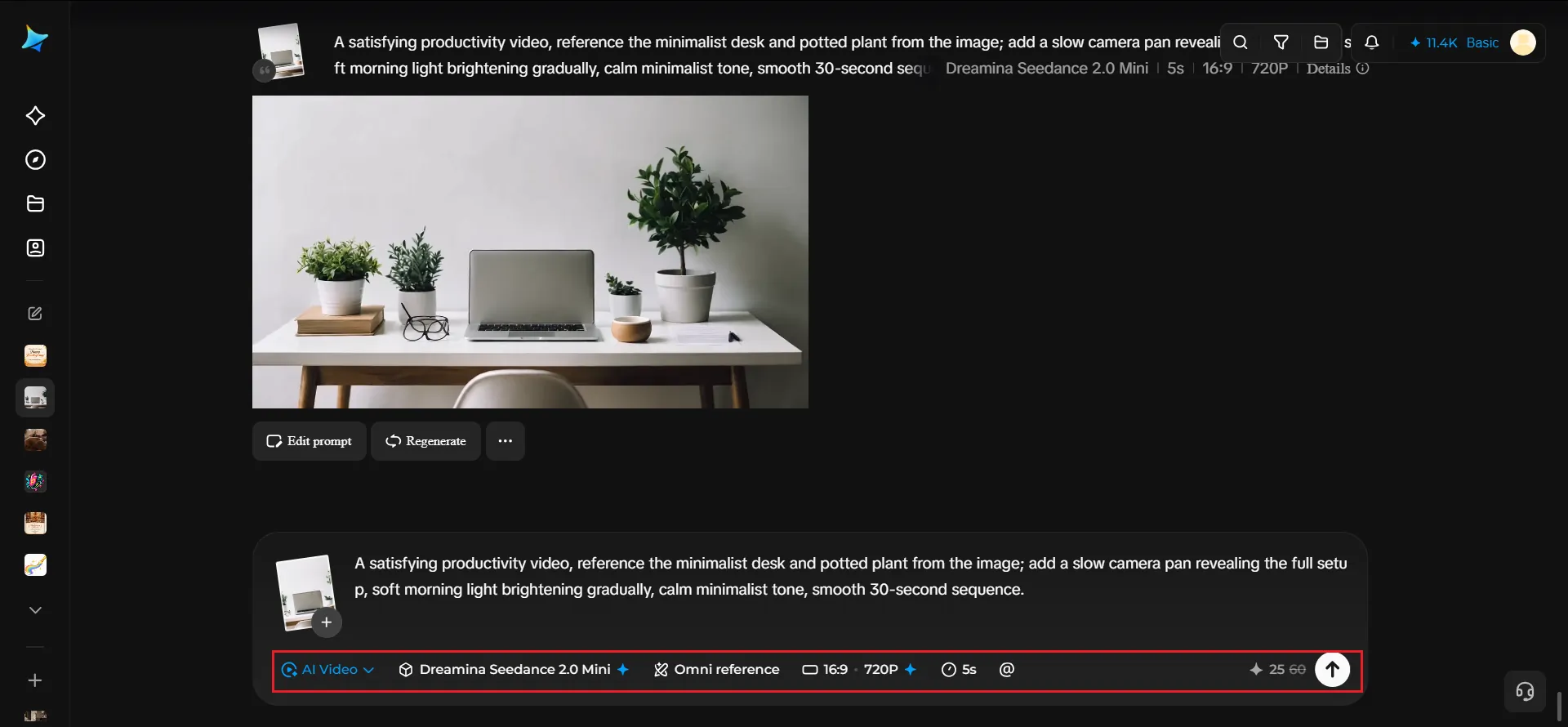
Start the prompt with the genre, then name the objects to keep, the motion and the tone. Keep the camera instruction separate from the object motion so that the model does not blend the two. The example below follows that order:
A satisfying productivity video, reference the minimalist desk and potted plant from the image; add a slow camera pan revealing the full setup, soft morning light brightening gradually, calm minimalist tone, smooth 30-second sequence
The prompt names the subject, the camera move, the light change, the tone and the duration, which leaves little room for unwanted motion.
Generate the video
After you add the image and the prompt, choose the Seedance 2.5 model. Select the video duration, then choose an aspect ratio appropriate to the destination platform. Use 16:9 for YouTube desk-tour content and 9:16 for TikTok and Instagram Reels.
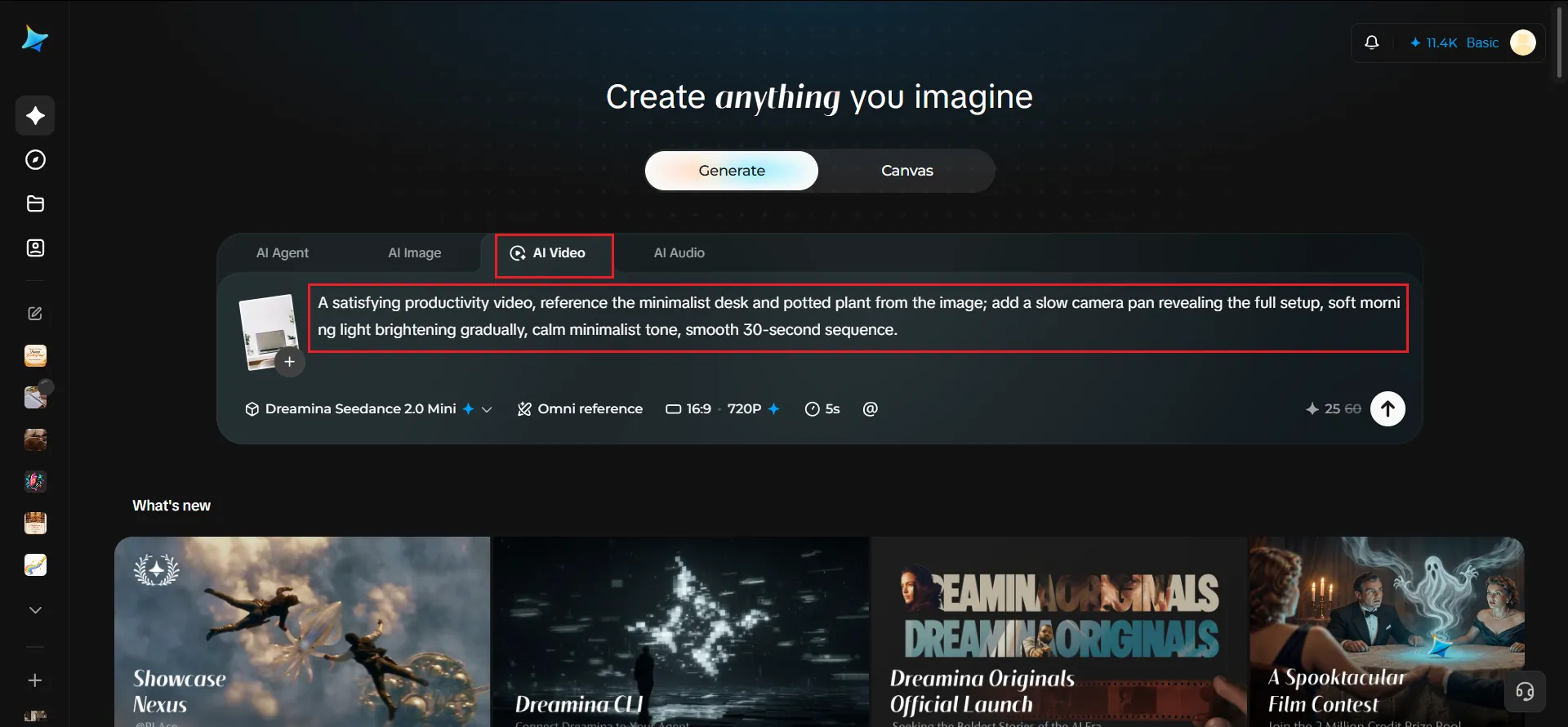
Hootsuite's cheat sheet lists a 9:16 aspect ratio for full-screen Reels and 1080 pixels by 1920 pixels as the recommended upload size.3 Click the generate button and allow a few seconds for processing, then review the clip for unwanted motion before proceeding to the next step.
Enhance and export the video
Polish the clip with Dreamina's AI editing tools before you save it. Use Upscale to produce a cleaner and sharper final resolution. Use Generate soundtrack to add a soft ambient track or subtle sound design that reinforces the calm mood.
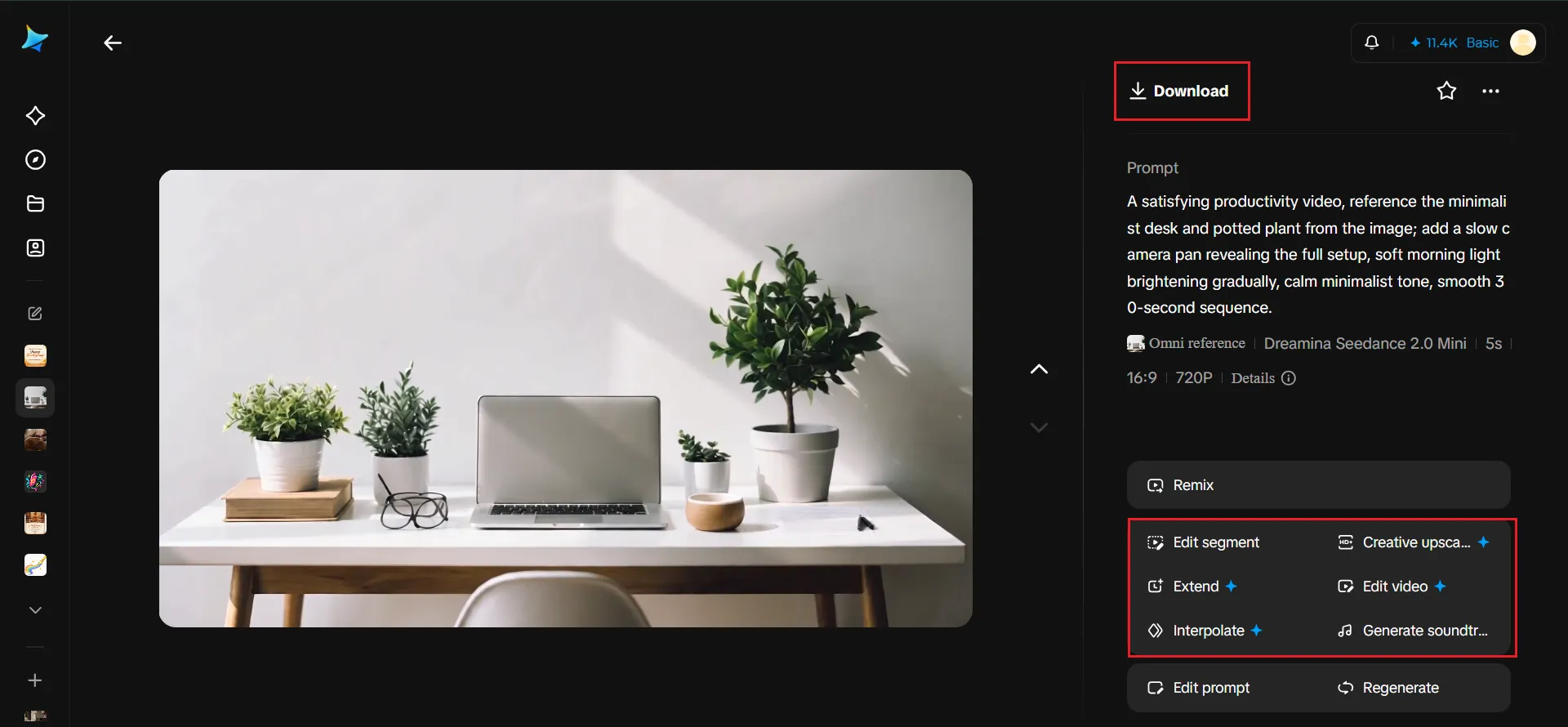
Match the sound to the motion on screen, such as a click for the lamp and a faint roll for the pen. Export the file and distribute it across your productivity or lifestyle content channels. Export both a vertical and a horizontal version if you plan to publish on short-form feeds and in desk-tour formats.
Using camera movement to guide the viewer's eye
Beyond object-level motion, a slow, deliberate camera pan or gentle push-in across the desk mimics the cinematography of desk-tour and productivity content. The effect makes the clip feel polished even when it started as a single still photo. Select a single camera movement for each clip, because combining a pan with a push-in forces the camera and the objects to compete for the viewer's attention. A pan suits a wide desk with items spread along it, while a push-in suits a single focal object such as a keyboard or a notebook. Describe the direction and the speed in the prompt, for example left to right at walking pace. Compare two or three generations before you choose one, since small wording changes in the pan description alter how much of the desk the viewer sees.
Choosing a color and lighting scheme that feels intentional
A cohesive, minimalist palette reinforces the sense of a deliberately curated space. Soft neutrals, warm wood tones and a single accent color work well together. The palette matters as much to the genre's appeal as the motion itself. Lighting carries the same weight: a soft morning light that brightens gradually, as in the example prompt, gives the clip a sense of progress without adding any objects. Match the color temperature of the light to the palette so that the transition feels natural instead of artificial. Avoid pronounced contrast between the illuminated and shadowed areas of the desk, because heavy shadows can obscure the objects that the viewer came to examine.
Building a themed series around different workspace moments
A single satisfying desk video is pleasant, but a recurring series gives followers a reason to return for the next installment.
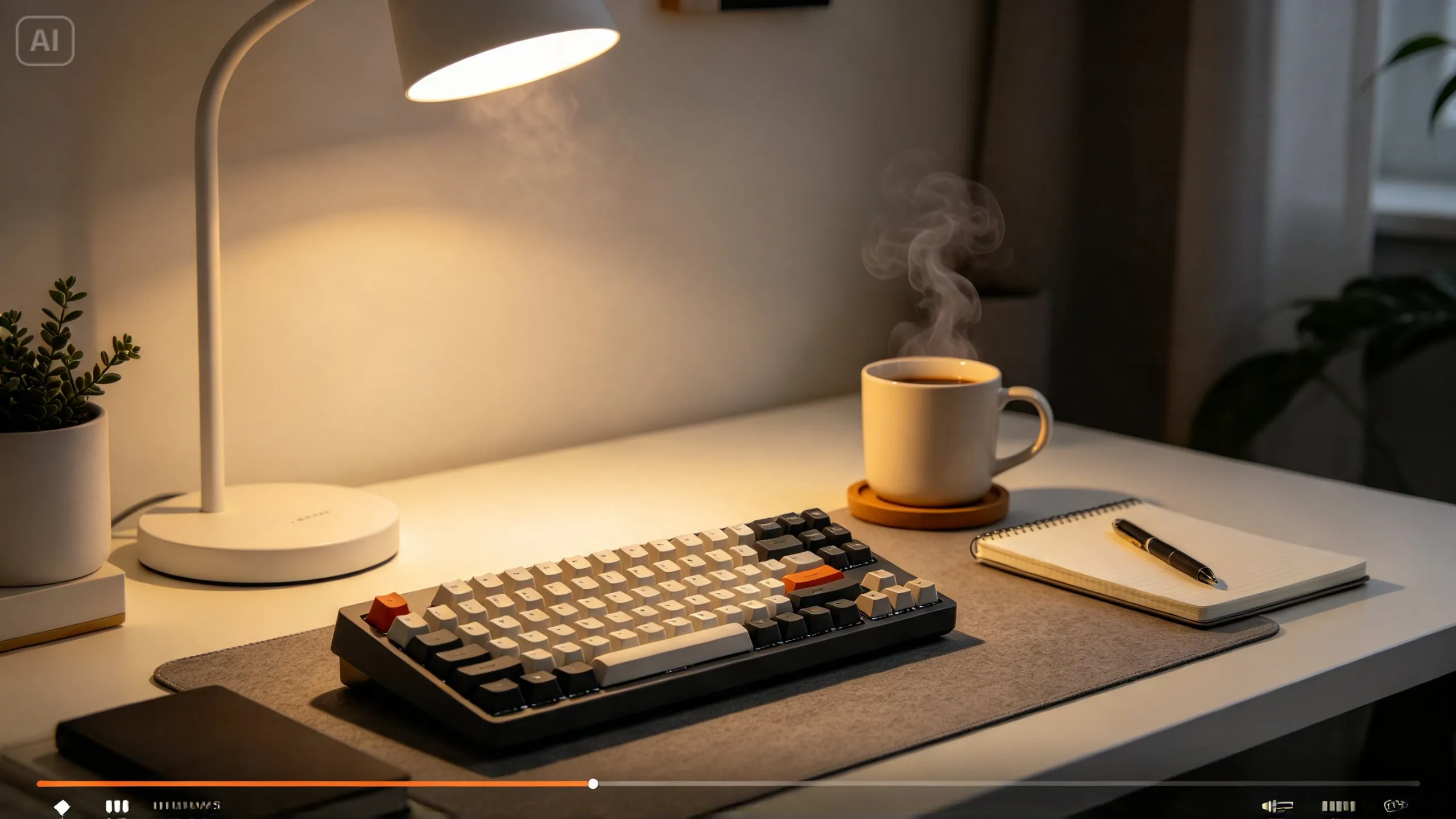
Cover different times of day, seasons or workspace configurations, and keep the framing consistent so that viewers recognize the series. A morning setup, an evening wind-down and a seasonal swap of accessories each reuse the same desk with a new mood. Apply a consistent naming format in titles and captions so that each installment references the others. Shoot the source photos in one session from the same camera position, then vary the props and the lighting between them. Analyze which installments retain viewer attention longest, and weight the next production batch toward those configurations.
Looping the video for background and ambient use
Beyond a single watch-through, many satisfying desk videos get reused as looping ambient content for study sessions or focus playlists. The audience for that use is established: CBS New York reported in 2018 that Study With Me videos offer students companionship while they prepare for big exams, and some of those videos drew hundreds of thousands of views.4 Design the motion so that the opening and closing frames look similar, which makes the clip loop more seamlessly. A lamp that brightens during the clip, for example, needs a matching dimming at the end or a cut that hides the reset. Test the loop by playing it three times consecutively while examining the seam between the final and opening frames. A clean loop extends the usefulness of the clip well past a single scroll-through view.
Where these productivity videos perform best
Satisfying desk and productivity content tends to do well across these channels:
- TikTok and Instagram Reels satisfying content niches
- YouTube Shorts productivity and desk-tour channels
- Study-with-me and focus-session content communities
- Stationery, tech and home office brand marketing
YouTube builds Shorts from vertical footage, and YouTube Help states that Shorts can run up to 3 minutes long and accept uploads at a maximum resolution of 1080p.5 A 30-second desk clip fits comfortably inside those limits. Brand teams in stationery, technology and home office categories can use the same format to demonstrate products in use without organizing a live photography session. Determine the publishing channel before generation, because the platform dictates both the aspect ratio and the length. Publish a vertical cut first on the short-form platforms, then adapt a horizontal version for desk-tour viewers.
- 1Brain tingles: first study of its kind reveals physiological benefits of ASMR
- 2Cinemagraph
- 32024 Instagram Reel sizes cheat sheet: specs, ratios, and more
- 4Misery loves company: Study With Me videos offer virtual support system for students preparing for big exams
- 5Get started creating YouTube Shorts - YouTube Help
A well-arranged desk already has visual appeal. It needs the right motion to become content that viewers enjoy watching. The pattern is consistent across the workflow: choose a photo with intentional arrangement, describe one deliberate movement, pick one camera move and match the light to the palette. Dreamina's Seedance 2.5 model supplies the controlled, small-scale motion that makes this genre work, and the surrounding choices decide whether the result feels calm or cluttered. Plan the aspect ratio and loop before you generate, then publish a series of workspace moments. Over time, a single desk photo can supply a month of content for short-form feeds, desk tours and focus playlists.
Citation
Cite this article
Sridharan, M. A. (2026, November 11). Satisfying Desk Videos From Photos. Think Insights. https://thinkinsights.net/community/satisfying-desk-videos-photos (Accessed [[ACCESS_DATE]])
Sridharan, Mithun A. "Satisfying Desk Videos From Photos." Think Insights, 11 Nov. 2026, https://thinkinsights.net/community/satisfying-desk-videos-photos. Accessed [[ACCESS_DATE]].
Mithun A. Sridharan, "Satisfying Desk Videos From Photos," Think Insights, November 11, 2026, https://thinkinsights.net/community/satisfying-desk-videos-photos. Accessed [[ACCESS_DATE]].
Sridharan, M.A. (2026) 'Satisfying Desk Videos From Photos', Think Insights. Available at: https://thinkinsights.net/community/satisfying-desk-videos-photos (Accessed: [[ACCESS_DATE]]).
M. A. Sridharan, "Satisfying Desk Videos From Photos," Think Insights, 2026. [Online]. Available: https://thinkinsights.net/community/satisfying-desk-videos-photos. [Accessed: [[ACCESS_DATE]]].
Sridharan MA. Satisfying Desk Videos From Photos. Think Insights. Published November 11, 2026. Accessed [[ACCESS_DATE]]. https://thinkinsights.net/community/satisfying-desk-videos-photos
Test Your Knowledge
Satisfying Desk Videos From Photos
Challenge yourself on the concepts from this article and see how well you understood them.
Subscribers get weekly quizzes and insights — subscribe free
Sponsor this article
Partner with Think Insights
Reach 50,000+ business leaders, consultants, and strategists. Feature your brand alongside expert articles on strategy, leadership, and digital transformation.
Become a Sponsor