Crypto Payment API MCP Server

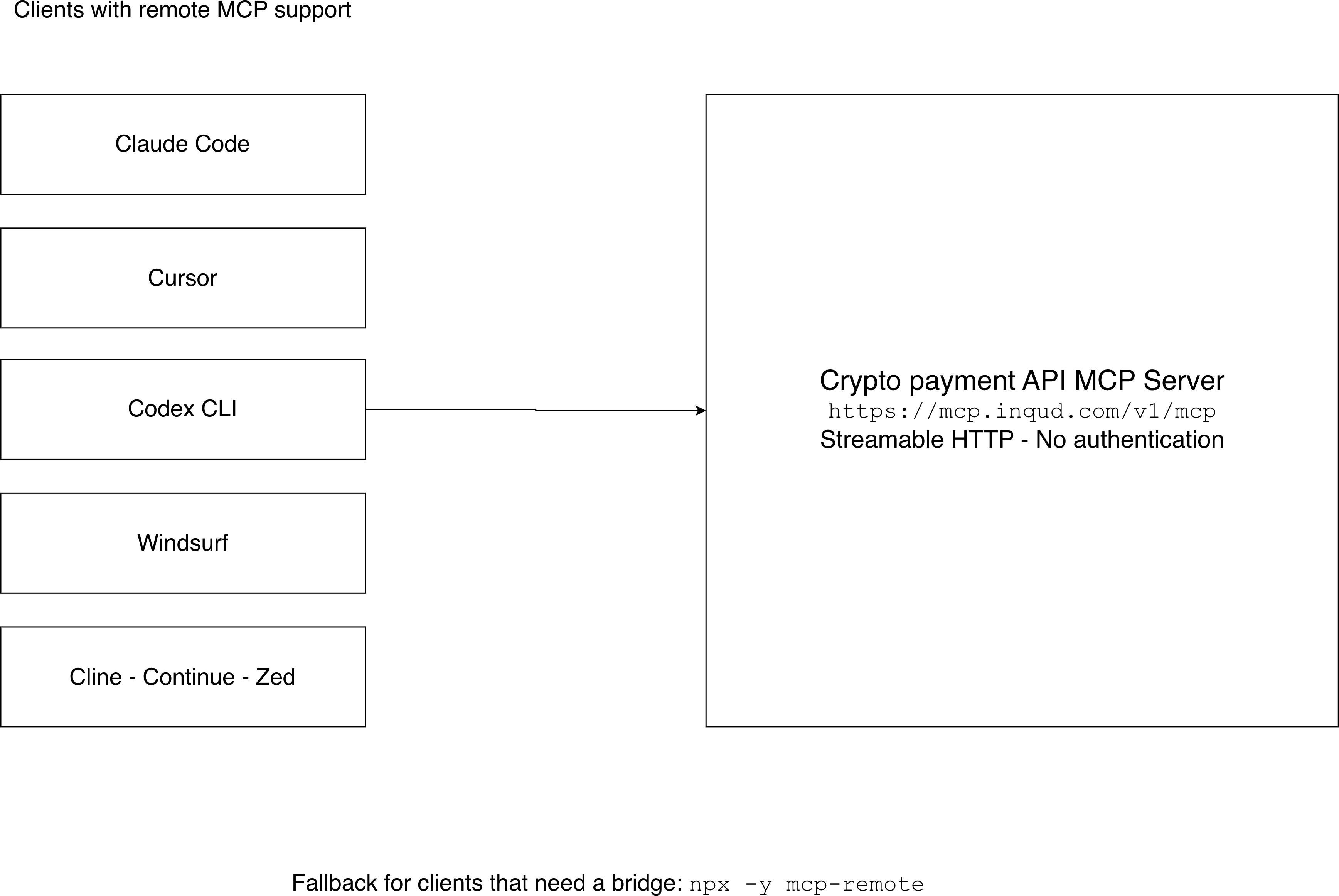
Connect your coding assistant to the Inqud crypto payment application programming interface [API] documentation with one remote Model Context Protocol [MCP] URL, https://mcp.inqud.com/v1/mcp, and one configuration entry in your client's own format. Use url for Cursor and Codex CLI, serverUrl for Windsurf and type http for Claude Code, and restart Cursor after saving. Verify the status in the client, then ask a live question about an endpoint and check that the assistant called a lookup tool. Keep the mcp-remote bridge as a fallback, because it needs Node.js. Expect lookup only: the server needs no authentication, creates no payments and sees no private data, so keep API keys in your own code.
How do I connect an MCP server to Cursor?
Add an entry named inqud under mcpServers in ~/.cursor/mcp.json or .cursor/mcp.json, with the server URL in the url field. Then restart Cursor and check Tools & MCPs in settings.
How do I add an MCP server to Claude Code?
Run claude mcp add --transport http inqud https://mcp.inqud.com/v1/mcp. Then open /mcp in a session and check that inqud shows as connected.
Does the server need an API key?
No. Connecting needs no authentication. API keys are needed only when your own code sends real requests to the API.
Can the MCP server make payments?
No. It serves public documentation and the API specification. It does not create payments and does not see private data.
Which clients does this guide cover?
Claude Code, Cursor, Codex CLI, Windsurf, Cline, Continue and Zed, plus an mcp-remote bridge for clients that need one. The URL is the same for every client, and only the config file and key differ.
What can the assistant look up through the server?
The server has five lookup tools: lookup_list_endpoints, lookup_search_endpoints, lookup_get_endpoint, lookup_search_docs and lookup_get_doc_page. They return endpoints, schemas and documentation pages.
Why does Windsurf use a different key?
Windsurf uses serverUrl instead of url. A snippet copied between clients often fails quietly, so use the key your client expects.
Do I need Node.js?
Only if your client requires the mcp-remote bridge, because the bridge runs through npx. Cline, Continue and Zed connect to a remote server directly by URL.
How do I verify that the connection works?
Check the server status in your client, such as /mcp in Claude Code or the Tools & MCPs panel in Cursor. Then ask about a specific endpoint and confirm that the assistant called a lookup tool instead of answering from memory.
What mistakes cause most failures?
Using another client's config key and forgetting to restart Cursor cause most failures. Other mistakes are using a bridge where you do not need one, expecting the server to act and hunting for credentials at setup.
A crypto payment application programming interface [API] Model Context Protocol [MCP] server gives your artificial intelligence [AI] coding assistant the API's public documentation and specification, so it can look up endpoints instead of guessing them. Connecting one takes a single remote URL and one config entry, and the same URL works in every client. This guide gives the exact setup for Claude Code, Cursor, Codex CLI, Windsurf, Cline, Continue and Zed, plus a bridge for clients that need one. Connecting needs no authentication. The server does not create payments and cannot see private data.
What you need before you connect
The server in this guide is the MCP server that Inqud publishes for its API.1 Its endpoint is:
https://mcp.inqud.com/v1/mcp
It uses Streamable HTTP and requires no authentication. You need an AI coding client that supports MCP. Node.js is needed only if your client requires the mcp-remote bridge, because the bridge runs through npx.
API keys are a separate matter. You need them only when your own code sends real requests to the API, never to connect this server.
The URL is the same for every client. What changes is the file you put it in and the key you put it under. Here is where each client keeps its configuration:
- Claude Code:
claude mcp add,~/.claude.jsonor.mcp.json; set"type": "http"andurl - Cursor:
~/.cursor/mcp.jsonor.cursor/mcp.json; add aninqudentry inmcpServerswithurl - Codex CLI:
~/.codex/config.toml; add a[mcp_servers.inqud]block withurl - Windsurf:
~/.codeium/windsurf/mcp_config.json; add anmcpServersentry withserverUrl - Cline, Continue, Zed: the client's MCP settings; add a remote server by
url(Cline:"type": "streamableHttp", Continue:type: streamable-http, Zed:context_servers) - Clients that need a bridge: the client's own MCP config; fallback:
npx -y mcp-remotebridge
Connect an MCP server to Cursor, Claude Code and other clients
Claude Code
To add an MCP server in Claude Code, run one command:
claude mcp add --transport http inqud https://mcp.inqud.com/v1/mcp
You can also edit the config by hand, in ~/.claude.json or in a project-level .mcp.json:
{
	"mcpServers": {
		"inqud": {
			"type": "http",
			"url": "https://mcp.inqud.com/v1/mcp"
		}
	}
}
The Claude Code documentation explains the scopes. By default the server is added for you, in the current project. --scope user makes it available across all your projects. --scope project writes it to .mcp.json at the project root, which you can commit so the whole team gets the same setup. Claude Code asks you to approve project-scoped servers before using them. The command only saves the configuration and does not test the connection, so check the status afterwards (see the verification section below).
Cursor
To connect an MCP server to Cursor, add an inqud entry under mcpServers in mcp.json. Use ~/.cursor/mcp.json for all projects or .cursor/mcp.json for one project:
{
	"mcpServers": {
		"inqud": {
			"url": "https://mcp.inqud.com/v1/mcp"
		}
	}
}
Restart Cursor after saving. Per the Cursor documentation, each key under mcpServers is a name you choose, and a remote server is defined by its url.
Codex CLI
Add a block to ~/.codex/config.toml:
[mcp_servers.inqud]
url = "https://mcp.inqud.com/v1/mcp"
Codex detects Streamable HTTP from the url field. If your Codex version fails to initialize the HTTP server, use the stdio bridge instead:
[mcp_servers.inqud]
command = "npx"
args = ["-y", "mcp-remote", "https://mcp.inqud.com/v1/mcp"]
Windsurf
Windsurf uses serverUrl instead of url. The file is ~/.codeium/windsurf/mcp_config.json, or %USERPROFILE%\.codeium\windsurf\mcp_config.json on Windows:
{
	"mcpServers": {
		"inqud": {
			"serverUrl": "https://mcp.inqud.com/v1/mcp"
		}
	}
}
Cline, Continue, Zed and the mcp-remote bridge
Cline, Continue and Zed support remote servers by URL, so they usually do not need a bridge. Only the config format differs:
- Cline: in
mcpServers, set"type": "streamableHttp"andurl. If you leavetypeout, Cline defaults to the legacy Server-Sent Events [SSE] transport - Continue: in the
mcpServersblock, settype: streamable-httpandurl. MCP servers work in Continue only in agent mode - Zed: in
settings.json, add the server undercontext_serverswith aurlfield
Keep the mcp-remote bridge as a fallback, for clients that can only run stdio servers or when remote connections fail in your client version. It runs through npx, so Node.js must be installed.2 Run it with:
npx -y mcp-remote https://mcp.inqud.com/v1/mcp
Then register that command as a stdio server in your client's MCP config.
What a crypto payment API MCP server gives your assistant
Inqud is a crypto payment platform for business, and its crypto payment api mcp server serves the API's public documentation and spec. That makes it a source of crypto payment API docs your assistant can query during a session, instead of relying on whatever it remembers from training data. The same idea applies to any API documentation for AI coding assistants: the assistant reads the current spec when you ask, not a copy someone pasted in last month.
In practice, the assistant first searches or lists endpoints to find the right one, then pulls that endpoint's details with its schemas, and falls back to the documentation pages when the question is about concepts rather than a single request. The server has five tools, all for lookup:
lookup_list_endpointslists the API endpointslookup_search_endpointssearches themlookup_get_endpointreturns one endpoint with its schemaslookup_search_docssearches documentation pageslookup_get_doc_pagereturns a documentation page
Its limits are as important as its tools:
- It does not create payments
- It does not see private data
- Connecting needs no authentication
- API keys are needed only for real requests, and your own code sends those, not the assistant through this server
Conditional example. You are in Cursor, writing a backend function for a payment flow. You ask: "What does the endpoint for a payment link accept?" The assistant searches the endpoints, fetches the matching one with its schemas and answers from that. You write the function and run it with your own credentials. The MCP server never touches an account.
How to verify the connection
Each client shows the connection a little differently:
- Claude Code. Run
/mcpinside a session.inqudshould show asconnected. From a terminal,claude mcp listshows the status of every server, andclaude mcp get inqudshows details for this one - Cursor. Open Cursor Settings, then Tools & MCPs, then User MCP Servers (
Cmd+Shift+J). The server should be green and list 5 tools. Menu names can differ between versions. If the server does not start, open the Output panel and select "MCP Logs" - Codex CLI. Run
codexand type/mcp. The server should appear in the list - Windsurf. Open the Cascade panel, click the MCPs icon (or go to Windsurf Settings, then Cascade, then MCP Servers) and click Refresh.
inqudshould appear with 5 tools - Any client, live test. Ask about a specific endpoint and check that the assistant called one of the lookup tools, such as
lookup_search_endpoints, instead of answering from memory
If the status is not green, compare your entry with the list above and read the mistakes section below. A wrong config key and a missing restart cause most failures. The reliable check is the one in your client: the server status plus a live question about an endpoint.

Common mistakes
- Using another client's config key. Windsurf needs
serverUrl. Cursor and Codex useurl. Claude Code wants"type": "http"next tourl. A snippet copied between clients often fails quietly - Forgetting to restart Cursor. Cursor picks up a new
mcp.jsonentry only after a restart - Using a bridge where you do not need one, or skipping Node.js. Cline, Continue and Zed connect to a remote server directly by URL. The
mcp-remotebridge is only for clients without that support, and it runs throughnpx, so Node.js has to be installed first - Expecting the server to act. It looks things up. It will not create a payment or show you a balance, so do not ask the assistant to do either through it
- Hunting for credentials at setup. Connecting needs no authentication. Keep API keys in your own code for real requests, and out of the chat
How this could work inside an accelerator
This is one way a collaboration could look, not a description of existing agreements.
The accelerator adds value for portfolio companies without building a payment layer of its own. It points teams to a ready setup: one URL and one config entry that gives their coding assistants the API documentation.
Startups get payment infrastructure from the start. Inqud's platform covers accepting crypto payments, conversion, payouts, on-ramp and off-ramp, and an over-the-counter [OTC] desk, and teams can connect through an API, an iFrame widget or a hosted payment page. Business customers go through know your business [KYB] verification.3
Inqud gets access to an ecosystem of projects and feedback from the teams building on its API.
Terms of any such arrangement would be agreed individually.
Connecting a Model Context Protocol [MCP] server to a crypto payment application programming interface [API] comes down to one URL and one config entry in the right format for your client. Claude Code takes a single command, Cursor a mcp.json entry, and Cline, Continue and Zed connect by URL too, with the mcp-remote bridge as a fallback. Check the connection in the client, then test it with a real question about an endpoint. The server only looks things up, so it creates no payments and sees no private data. The assistant gets current documentation, while payments and API keys stay in your own code.
Citation
Cite this article
Sridharan, M. A. (2026, November 17). Crypto Payment API MCP Server. Think Insights. https://thinkinsights.net/community/crypto-payment-api-mcp-server (Accessed [[ACCESS_DATE]])
Sridharan, Mithun A. "Crypto Payment API MCP Server." Think Insights, 17 Nov. 2026, https://thinkinsights.net/community/crypto-payment-api-mcp-server. Accessed [[ACCESS_DATE]].
Mithun A. Sridharan, "Crypto Payment API MCP Server," Think Insights, November 17, 2026, https://thinkinsights.net/community/crypto-payment-api-mcp-server. Accessed [[ACCESS_DATE]].
Sridharan, M.A. (2026) 'Crypto Payment API MCP Server', Think Insights. Available at: https://thinkinsights.net/community/crypto-payment-api-mcp-server (Accessed: [[ACCESS_DATE]]).
M. A. Sridharan, "Crypto Payment API MCP Server," Think Insights, 2026. [Online]. Available: https://thinkinsights.net/community/crypto-payment-api-mcp-server. [Accessed: [[ACCESS_DATE]]].
Sridharan MA. Crypto Payment API MCP Server. Think Insights. Published November 17, 2026. Accessed [[ACCESS_DATE]]. https://thinkinsights.net/community/crypto-payment-api-mcp-server
Test Your Knowledge
Crypto Payment API MCP Server
Challenge yourself on the concepts from this article and see how well you understood them.
Subscribers get weekly quizzes and insights — subscribe free
Sponsor this article
Partner with Think Insights
Reach 50,000+ business leaders, consultants, and strategists. Feature your brand alongside expert articles on strategy, leadership, and digital transformation.
Become a Sponsor